
Configure a specialist's internet access
Internet access controls outbound connections made by code run by a specialist. Connected tools keep their own permissions; changing this setting does not grant access to a connector’s tools.
Before you begin
Section titled “Before you begin”You need permission to edit the specialist. Open the specialist from Specialists, enter its edit screen, and expand Advanced — system prompt and internet access.
Choose an access level
Section titled “Choose an access level”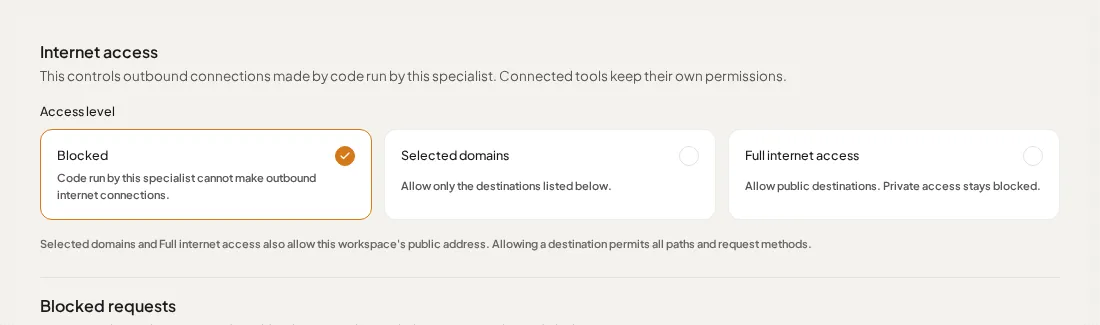
| Access level | What it allows |
|---|---|
| Blocked | Code cannot make outbound internet connections. |
| Selected domains | Code can reach the destinations you list. |
| Full internet access | Code can reach public destinations. Private access stays blocked. |
Selected domains and Full internet access also allow your workspace’s public address.
Allow specific domains
Section titled “Allow specific domains”- Select Selected domains.
- In Allowed domains, enter one hostname per line.
- Use an exact hostname such as
api.example.com, or a wildcard such as*.example.com. - Select Save in the specialist’s edit screen.
Enter hostnames without https:// or a URL path. A wildcard includes subdomains at any depth, but it does not include the bare domain. To allow both, enter:
example.com*.example.comAllowing a destination permits all paths and request methods at that destination. Use the narrowest set of destinations that supports the task.
If a saved domain displays custom access, review the listed ports and private-access scope before editing it. Ask your administrator if you are unsure why that access is present.
Confirm the change
Section titled “Confirm the change”Reopen the edit screen and check that the saved access level and domains are correct. Ask the specialist to retry the task that needed the connection.
If it still cannot connect, inspect Blocked requests beneath the settings and follow Understand blocked internet requests.
If someone else changes the settings
Section titled “If someone else changes the settings”If Lifter reports that internet access changed elsewhere while you were editing, select Reload saved version to review the current settings. Choosing Save instead overwrites them with your draft.